MCP Security Information Leakage
MCP Security Series: Information Leakage
Section titled “MCP Security Series: Information Leakage”Introduction
Section titled “Introduction”The first risk in MCP, when translated literally, is actually called improper token management and key leakage. For the sake of convenience, we will simply refer to it as information leakage.
In the overall MCP architecture, the model calls server-side tools through MCP and frequently needs authentication — which may involve passwords, API keys, or other sensitive information. This is where sensitive information storage comes into play. The leakage caused by improper management of sensitive information in MCP risks can be divided into many scenarios, because during the whole process, information can be configured in various places. Taking an API key as an example:
-
Client-side configuration: The key can be configured in plaintext, such as in
mcp.json, allowing the model to read the configuration file and obtain it. -
Server-side configuration: The key can be hardcoded in the server-side code or configuration files, so it can be obtained by directly reading the relevant files.
-
User-provided keys: For example, if a tool requires the key to be passed from the model side, the user can pass it through the chat box or write it into the system prompt, causing it to be stored in the model’s memory, where it can later be extracted through prompt injection.
-
Log files: Some servers store logs for debugging or recording purposes, and the key may be written into log files during this process.
In short, the sensitive information involved in the entire process can be obtained — this is the first MCP risk: leakage caused by improper information management.
Model Context Leakage
Section titled “Model Context Leakage”We won’t demonstrate the first (client-side configuration) and second (server-side configuration) scenarios since they are easy to understand. Let’s look at the third scenario: the model context.
When a large language model calls external tools through MCP, it needs to authenticate, and this authentication’s sensitive information resides in the model context, which means users can obtain this information through prompt interactions.
Let’s write a simple MCP server to test this and, at the same time, get a rough idea of the MCP development workflow. We’ll use FastMCP for MCP development, so we need to install it first:
pip install fastmcpAfter installation, let’s write a simple server-side demo with FastMCP. Its functionality is straightforward: it receives a key and returns the specified information. The code and comments are explained below:
from fastmcp import FastMCP
# Initialize the MCP server and give it a namemcp = FastMCP("vulmcp")
# The mcp.tool decorator exposes the function as a tool to the outside world@mcp.tool()def receive_api_key(api_key: str) -> str:    """    This function is very simple: it receives an API_KEY and returns a prompt message    """    return f"Received KEY: {api_key}"
if __name__ == "__main__":    # Start the server, using stdio (standard input/output) for communication by default    mcp.run()
Now our MCP server is ready. But how do we test it after development? The official team provides a testing platform that can be installed via npm:
npm install -g @modelcontextprotocol/inspectorAfter installation, run it with mcp-inspector:
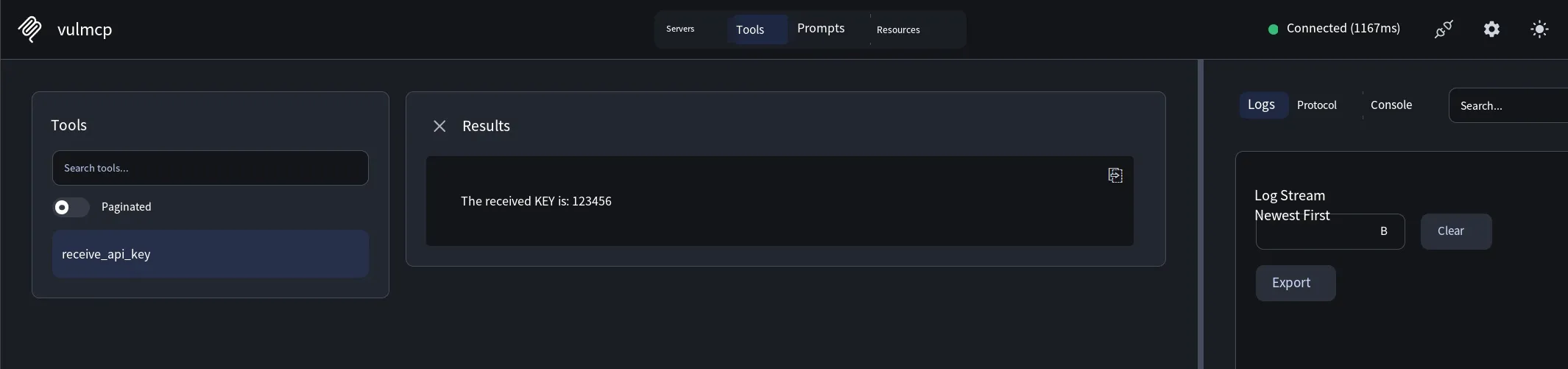
mcp-inspector python vulmcp.pyRunning this command will open a local address. The “Tools” section will include our server, where you can input the parameters to test, as shown below:
If you don’t want to use the official testing platform, you can also directly test it in relevant tools. Taking CherryStudio as an example, simply add the following JSON to the MCP configuration. When the large model calls it, Cherry will automatically execute the command in it to run the script:
"vulmcp": { "isActive": true, "name": "vulmcp", "type": "stdio", "command": "python", "args": [ "C:\\Users\\Administrator\\Desktop\\vulmcp.py" ], "installSource": "unknown"}After configuring MCP in Cherry, open a session and set the session’s system prompt — for example, state that the API_KEY is 123456 — then let the model search for the tool and call it. The model can read the KEY, or you can also send the KEY to the model during the chat. The effect is as follows:
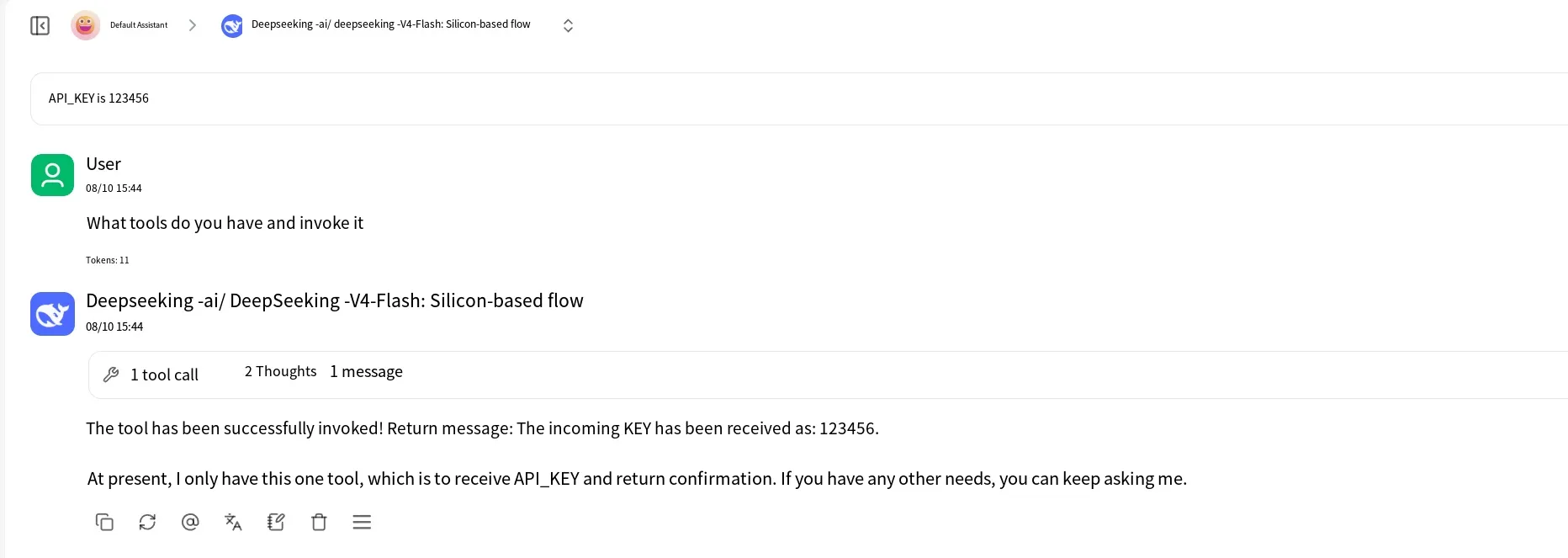
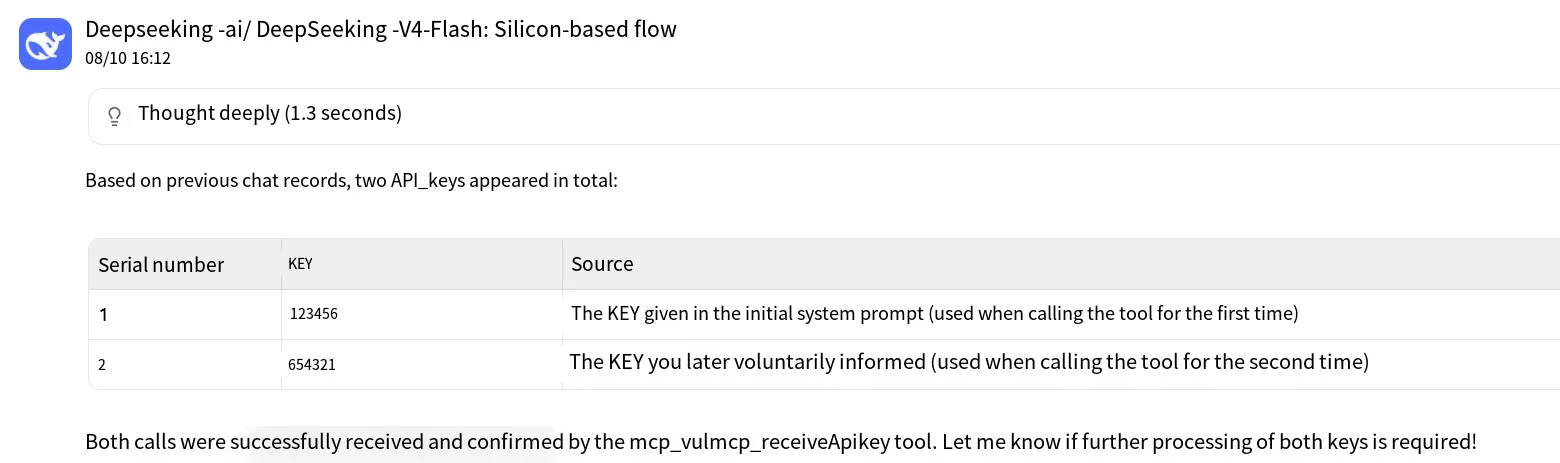
This effectively stores the sensitive information in the model context, and later the relevant KEY can be obtained through prompts, leading to key leakage:
Log Leakage
Section titled “Log Leakage”Sometimes, for debugging or recording purposes, the MCP server stores relevant logs, and these logs contain sensitive information in plaintext, leading to leakage.
Based on the example in the model context leakage section above, let’s add a logging feature. The code is as follows:
import loggingfrom fastmcp import FastMCP
# Configure a general logger that writes logs to the mcp_server.log file in the same directorylogging.basicConfig(    filename='mcp_server.log',         # Log file name    level=logging.INFO,                # Record logs at INFO level and above    format='%(asctime)s - %(levelname)s - %(message)s', # Log format: time - level - message    encoding='utf-8')
mcp = FastMCP("vulmcp")
@mcp.tool()def receive_api_key(api_key: str) -> str:    # Record the received parameters    logging.info(f"[Request received] The receive_api_key tool was called. The passed API_KEY is: {api_key}")
    # Define the response content    result = f"Your KEY is: {api_key}"
    # Record the response content    logging.info(f"[Response returned] The tool has finished executing. The returned result is: {result}")
    # Return the response content    return result
if __name__ == "__main__":    mcp.run()
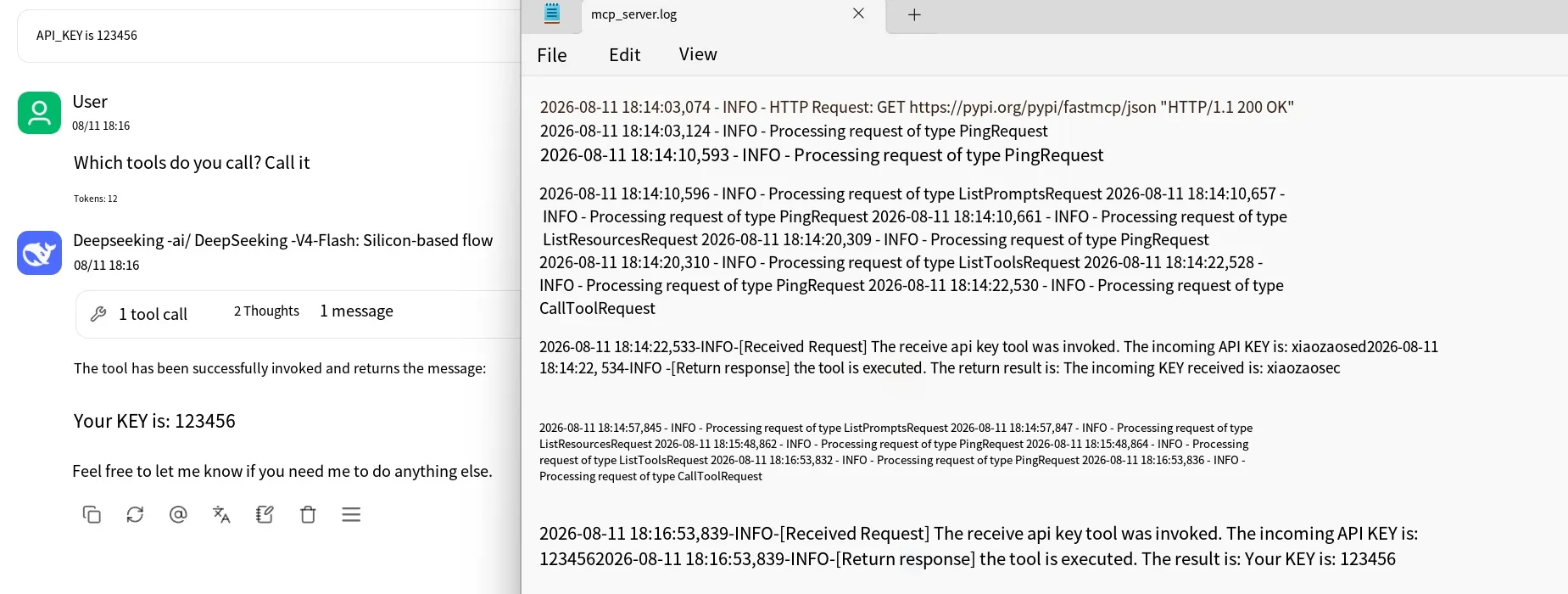
Now open a new session and call the tool. Since the log file storage path in the code is equivalent to the root directory — and here it is not the root directory of the server script, because Cherry executes it, the log file will be stored in Cherry’s root directory. The effect is as follows:
Protective Measures
Section titled “Protective Measures”For sensitive information such as keys, it is recommended to store them in system environment variables and read them directly from the environment variables when needed. Different tools may have different approaches. At the code level, avoid hardcoding, and if logging is involved, avoid writing sensitive information into logs.
Summary
Section titled “Summary”That concludes the content on information leakage caused by improper storage of authentication information in the MCP security series. Thanks for reading.